
Home Office Organization Services for Better Storage, Workflow, and Productivity

An organized home office improves storage capacity, cable safety, desk ergonomics, and daily workflow by giving every item, cord, and device a clear place to live. Professional setup reduces clutter, improves desk placement, organizes electronics and supplies, and creates a cleaner work environment where focus comes easier. The result is a room that supports comfort, efficiency, and steady productivity from the first task to the last.
- Better workspace efficiency through smart zoning and layout planning
- Smarter storage organization for files, supplies, and equipment
- Cleaner cable management for safer, tidier workstations
- Improved productivity and focus with ergonomic desk placement
- Reduced clutter for an easier daily workflow
A home office spirals into chaos faster than most people expect. Desks pile up with files, monitors crowd the surface, printers sit on the floor, cords snake behind chairs, and moving boxes linger long after a relocation. That clutter quietly steals time. Workers misplace supplies, lose focus, and battle uncomfortable layouts that make long hours harder than they should be. Professional home office organization services solve this by resetting the room from the ground up. Trained pros plan storage, position the desk for comfort, route cables cleanly, and arrange equipment so the space actually supports the work happening inside it.
Why Home Office Organization Improves Productivity
A well-organized home office removes the small frictions that drain focus throughout the day. When the desk is clear, supplies are reachable, and equipment runs without tangled cords, the brain spends less energy hunting and more energy working, which directly lifts home office productivity.
Remote workers often notice the change within the first week. A freelancer who used to dig through stacked paperwork can grab a labeled folder instantly. A work from home parent gains quiet zones for calls without distractions in the background. A hybrid worker finally has a docking spot for the laptop that does not require unplugging three cables every morning. For larger workspace transitions, pairing organization with office moving help keeps the reset efficient and damage-free.
How Better Storage Creates a More Functional Workspace
Strong storage planning is the backbone of any productive home office. It keeps daily-use items within arm's reach, archives rarely used papers out of sight, and leaves the desk surface open for active work. Good home office storage solutions also protect equipment and prevent the slow creep of clutter onto every flat surface.
Helpful storage upgrades include:
- Vertical shelving above the desk for books, binders, and reference materials
- Under-desk drawer units for stationery and frequently used tools
- Filing cabinets with clearly labeled folders for active and archived documents
- Closed cabinets for printers, paper stock, and bulky office supplies
- Wall-mounted organizers for headphones, chargers, and small electronics
Thoughtful storage cabinet placement keeps heavy items low, lighter items high, and traffic paths fully clear.
What Common Home Office Layout Mistakes Reduce Efficiency
Many home offices struggle not because they lack space, but because the layout works against the user. Poor desk angles, awkward storage placement, and crowded corners create daily friction that adds up over weeks and months of work.
Common layout mistakes to avoid:
- Pushing the desk against a wall with no natural light or visual break
- Stacking storage units in front of outlets, vents, or window sills
- Placing the printer across the room from the desk it serves
- Leaving extension cords running across walking paths
- Crowding the chair zone with bins, boxes, or extra furniture
- Ignoring acoustics in shared homes, which hurts video call quality
Apartment residents and small-home users feel these mistakes the most, since every square foot has to perform.
How Cable Management Improves Workspace Safety and Appearance
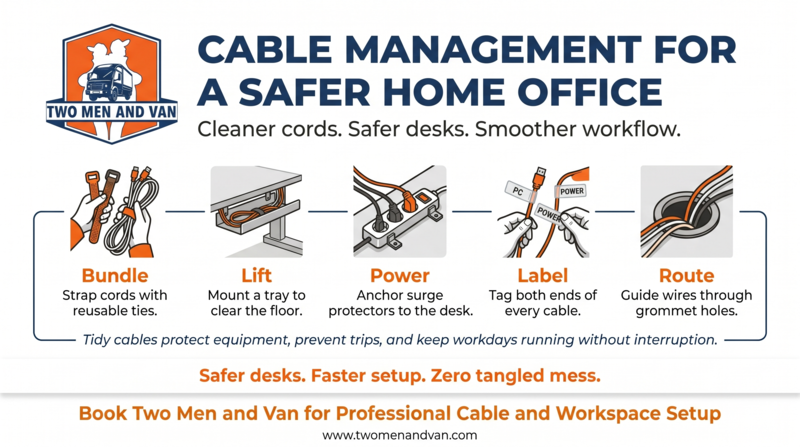
Cable management improves both safety and visual calm. Loose cords cause tripping hazards, dust traps, and accidental disconnections that interrupt meetings or corrupt files. Tidy routing also makes cleaning easier and helps electronics run cooler by improving airflow around the desk.
Effective cable management techniques include:
- Bundling cords with reusable hook and loop straps
- Mounting a cable tray under the desk to lift wires off the floor
- Using surge-protected power strips anchored to the desk frame
- Labeling each cord at both ends for fast troubleshooting
- Routing monitor and charger cables through grommet holes
Professionals who safely move electronics typically reset cable runs during installation, which saves hours of untangling later.
Why Desk Placement Affects Workflow and Comfort
Desk placement shapes posture, lighting, focus, and call quality. The right position reduces glare on the monitor, supports natural light, and keeps the user facing the room rather than a blank wall. A poorly placed desk creates neck strain, screen reflections, and constant background distractions.
Smart desk placement tips:
- Position the desk perpendicular to a window to balance daylight
- Keep at least three feet of clearance behind the chair
- Face the door when possible to reduce startle interruptions
- Avoid placing the desk directly under ceiling vents or fans
- Pair the desk with an ergonomic chair at matching height
Browsing home desk ideas can help users compare shapes and sizes before committing to a layout.
What Storage Solutions Help Reduce Office Clutter
Reducing clutter starts with sorting, then storing, then maintaining. A home-based consultant might keep client folders in a locked drawer, while a freelancer may need open shelving for active projects. The right mix depends on how often each item is used.
| Item Type | Best Storage Solution | Access Frequency |
|---|---|---|
| Daily supplies | Desk drawer organizers | Multiple times daily |
| Active files | Rolling file cabinet | Weekly |
| Reference books | Wall shelving | Monthly |
| Archived documents | Closed storage bins | Rarely |
| Electronics and cables | Labeled drawer or tote | As needed |
| Printer and paper | Closed cabinet or cart | Weekly |
Compact desk setups benefit from dual-purpose furniture, while shared home offices often need locked storage to separate user belongings.
How Equipment Setup Supports Daily Work Performance
A well-arranged equipment zone keeps monitors, keyboards, docking stations, and accessories at the right height and distance. Proper computer workstation setup reduces eye strain, supports posture, and lets the user transition between tasks without rearranging the desk.
Helpful equipment setup practices:
- Mount monitors on adjustable arms to free desk space
- Place the keyboard so elbows rest near a 90-degree angle
- Keep the webcam at eye level for better video calls
- Group accessories such as scanners and headsets within arm's reach
- Use a dedicated charging station for phones and tablets
Business professionals upgrading multiple rooms often combine workstation setup with office furniture installation to complete the room in a single visit.
Why Professional Organization Services Save Time and Effort
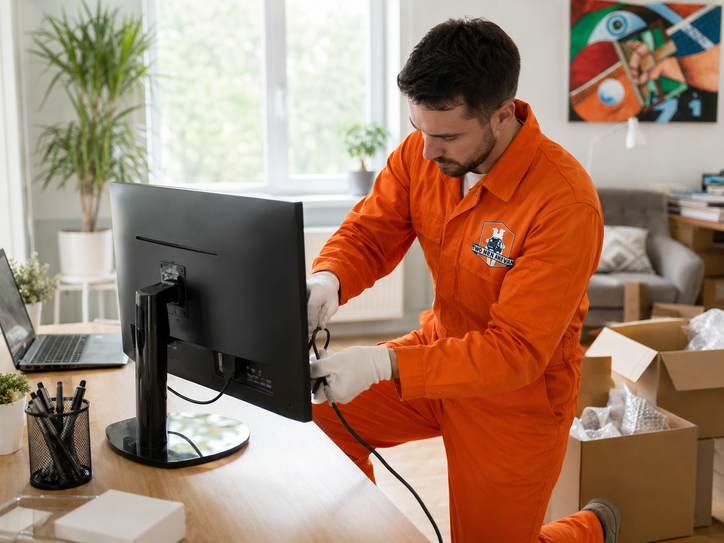
Home office organization services help arrange desks, storage, electronics, files, cables, and workspace zones so the room supports better focus, easier movement, and more productive daily work. Hiring trained pros means the heavy lifting, planning, and assembly happen in hours instead of weekends.
Professionals also handle the parts most homeowners dread, including office furniture disassembly, large item moving, and full office relocation setup. They protect equipment during transport, document conditions to avoid disputes over lost damaged items, and reassemble everything in the new layout. Flexible moving service options make it easy to combine organization with relocation, decluttering, or seasonal resets.
When Homeowners Should Upgrade Their Home Office Setup
Some upgrades can wait, but others signal that the current setup is no longer serving the work. Recognizing the signs early prevents productivity loss and physical discomfort.
Consider upgrading when:
- The desk feels cramped after adding a second monitor or laptop dock
- Cables tangle every time the chair moves
- Storage overflows onto the floor or guest furniture
- A new family member needs a quiet workspace nearby
- Back, neck, or wrist pain appears after long sessions
- A recent move left boxes unpacked in the office zone
- College-age children need a focused study area, similar to student housing setup
Hybrid workers and growing households tend to outgrow their first home office within two to three years.
Get Reliable Home Office Organization Help
Two Men and Van delivers organized storage, smoother workflow, safer cable management, and comfortable workstation setups built for daily productivity. The team can refresh a single corner, redesign a full room, or combine organization with TV mounting setup for shared family spaces. Old equipment, broken furniture, and bulky packing waste can leave with the crew through disposal recycling support, and outdoor gear gets the same attention through outdoor equipment care. Ready to reset the workspace? Contact Two Men to schedule a visit.
Frequently Asked Questions About Home Office Organization Services
How do you organize a home office effectively?
Start by sorting every item into keep, store, or remove categories before placing anything back on the desk. Then assign zones for work, storage, and equipment so each task has a clear home. Finish with cable routing and a quick test run of the daily workflow.
What storage works best for home offices?
The best storage mixes open shelving for daily items, closed cabinets for bulky supplies, and filing units for documents. Vertical storage saves floor space, while drawer organizers keep small items from drifting. Match the storage type to how often each item is used.
How does desk placement affect productivity?
Desk placement controls lighting, posture, and focus. A desk near natural light reduces eye strain, while facing the room limits startle interruptions during deep work. Poor placement can cause glare, neck pain, and constant rearranging that breaks concentration.
How do you reduce home office clutter?
Declutter by removing items that have not been used in the last ninety days. Group remaining supplies by category and store them in labeled containers. Maintain the system with a five-minute reset at the end of each workday.
Does cable management improve workspace safety?
Yes. Organized cables prevent tripping, reduce fire risk from overloaded outlets, and keep dust from building up around electronics. Tidy routing also makes it easier to unplug devices quickly during storms or power issues.
When are professional organization services worth it?
Professional help pays off when the workspace feels overwhelming, after a move, or when work hours are being lost to clutter and discomfort. Trained crews finish in hours what often takes homeowners several weekends. They also handle heavy furniture and electronics safely.
How long does home office setup take?
Most home office setups take three to six hours, depending on room size, furniture count, and storage complexity. Larger projects with full relocations or custom shelving may extend into a second visit. A quick walkthrough beforehand helps confirm the timeline.
Can home office organization help small apartments?
Absolutely. Apartments benefit the most from vertical storage, multi-purpose furniture, and tight cable routing. A professional layout can turn a corner of the living room into a focused workspace without crowding the rest of the home.
Connect With Us
Stay connected with us for moving tips, customer stories, special promotions, and behind-the-scenes content. Follow Two Men and Van on social media to get helpful advice and updates on our services across Maryland, DC, Northern Virginia, Pennsylvania, and Delaware.
- Facebook - Join our community for moving tips and seasonal offers
- Instagram - See real moves, packing hacks, and customer testimonials
- Instagram Washington - Follow our Washington area team for local moving insights
Get inspired, ask questions, and see why thousands of customers trust Two Men and Van for their interstate and local moves.